

The new version of WhatsApp Messenger is out, and one of its key new features is that group admins can now restrict message sending to only admins. Open " Group Info " > tap " Group Settings ." Non-admins can still read messages and reply privately by tapping " Message to admin ."
As everyone knows, WhatsApp Messenger is the most famous instant messaging application in the world, and having the latest version is the best way to keep the app updated with the latest features and extras it offers each time it is renewed.
Furthermore, with each new update, we will have new security and privacy measures in the version of WhatsApp that we have installed, whether on our Android smartphone, iPhone, Windows Phone, tablet, or even in the Web version, whether you have Mac or Windows.
Why is it important to download and install the latest available WhatsApp Messenger update?
Today, it would be almost impossible to live without this incredible app. WhatsApp has become much more than just an app for chatting with friends ; it's now an integral part of our lives and our new way of communicating. That's why a new version of the app is released so frequently , whether in Beta or Stable , always incorporating new features.
These are the new tools and features included in the latest version of the App:
- 🎥 Video calls
- 📝 New statuses
- 🔗 Send hyperlinks
- 🎙 Voice messages
- 📍 Locations
- 🙀 Endless list of totally revamped emojis
- 🎞 Watch YouTube videos while chatting – Picture in Picture (PiP)
- 👂 Listen to chain audios
- 🏝 Activate vacation mode
In short, a host of new features make this instant messaging app unbeatable. If you're someone who always likes to stay up-to-date and needs the latest version of WhatsApp, you're in the right place. Here you can download the latest updates for free for your favorite messaging app.
It's not just important to keep WhatsApp updated to access new features, but for something much more important: security and privacy . With each new release of the app, the antivirus systems are updated, resulting in a much more secure and reliable application.
In many cases we will not be able to update WhatsApp For various reasons, whether the download site isn't working, there are errors in the application, or our mobile device simply malfunctions, this is no reason to worry because There are different ways to find out how to update WhatsApp If any of these errors occur, and The best part is that we tell you all about them here!
How to install and update WhatsApp for free from Google Play on Android?
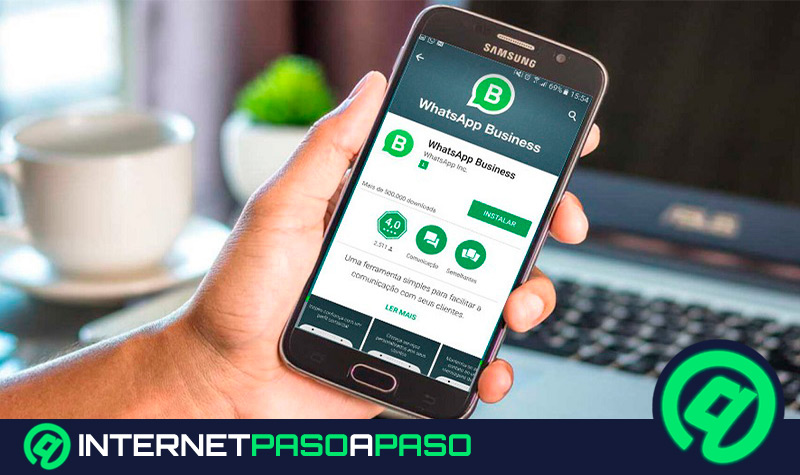
If what you want is to download and install the New WhatsApp update for your Android phone, free of chargeThe quickest and easiest way is to do it using the Google Play Store  Let's go step by step and with images, that way everything will be much clearer.
Updates compatible with Android phones from Samsung, LG, HTC, Huawei, etc.
Automatic method
Step 1: Open our app and if there is a new version, it will automatically notify you and the following message will appear:
"Update? A new version of WhatsApp is available. Do you want to install it now?"

Step 2: Click " Accept " and install the new update following the steps indicated. It's simple, although in some cases some problems may arise that we will solve later.
Direct method
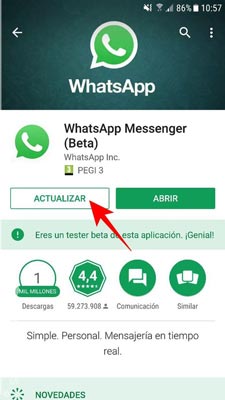

 In the search engine we type «WhatsApp Messengeror we access the download links below. We will see that there are two buttons, one that says «uninstall» and another «OPEN"There is no recent version this time; if there were, instead of..."OPEN"it would put us"Update«.
Well, we're in luck! If there's a new version available, just tap the " Update " button and the app will automatically start downloading. The download speed will depend on your internet connection, but it shouldn't take too long. And that's it! You now have the new version installed and running on your Android smartphone—it's that easy!
Extra trick
One way to find out which version we have installed on our Android smartphone is to access the following within WhatsApp:
Settings > Help > App Info
How to download the latest version of WhatsApp Messenger on iPhones?
If you're a loyal Apple fan and own an iPhone with iOS, you'll be able to download and install the latest Spanish version of WhatsApp without any problems. App Store  That's why I've put it together for you step by step with pictures so you won't have any doubts.
Latest WhatsApp updates compatible with iPhone 4, 5, 6, 7 and 8 and later
Automatic method
Step 1: Just like on Android, the app will notify us if there is a new " update " ready to install when we open the application, notifying us with this message:
"Update? A new version of WhatsApp is available. Do you want to install it now?"
Step 2: Accept and the download and subsequent installation will begin. The speed of the update process on your iPhone will depend on your internet connection. That's it!
direct method
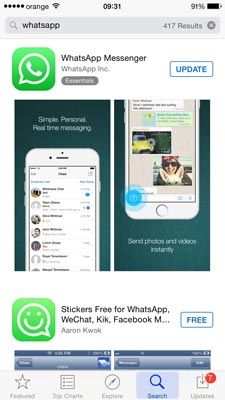
 If it existed, a button with the word «Updatebut, I would just putOPEN"We press the button of..."Update"And we follow the steps described above, and that's it, we already have the new features and updates of our favorite app to chat with friends."
Extra trick
If we want to reinstall WhatsApp on our iPhone, whatever the model, the first thing we have to do is delete the application. Always, for safety, make a backup ; you never know when your internet or data connection might fail.
Once done, We press and hold the WhatsApp icon for a couple of seconds that appears on our phone screen, this The icon will begin to vibrate and one will appear X If it's red, press it to delete it and then install it later. automatic method of this guide.
How to update WhatsApp for Windows Phone without paying?
If you're using a Windows Phone device, you can update without any problems by following the steps I'm about to explain. As usual, there isn't just one way to do it, so we'll look at different options to download and install WhatsApp on your Windows Phone smartphone and have the app fully updated.
Updates compatible with Windows Phone V.7, V.8, 10 Mobile etc.
Automatic method
Step 1: As usual, our favorite messaging app will automatically notify us of the existence of a new update when we open it on our Windows operating system smartphone with the following message.
"Update? A new version of WhatsApp is available. Do you want to install it now?"
Step 2: If we agree, we click "Accept," and the download will begin automatically, followed by the installation. Keep in mind that it's preferable to update while connected to a Wi-Fi network, as the process will be much faster.
direct method
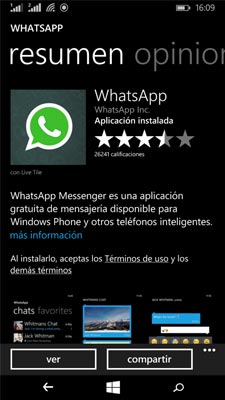
 We can perform the update ourselves and automatically; all we have to do is Click on More (…) Within the Microsoft Store, a menu will appear, and we access where it says ConfigurationOnce there, we press Search for updatesAnd what if there was a new version of the WhatsApp app at that time? We'll be able to update it without any problems..
Extra trick
If you receive a numerical error code or see the message " Attention Required " or " Waiting for a Wi-Fi connection " during the WhatsApp update process, go to the Microsoft Store , tap More... a drop-down menu will appear, then go to Settings , then App updates , and check the Settings tab . It might not be configured correctly, and you may need to change some settings. If you've followed these steps correctly, you should be able to update WhatsApp Messenger for Windows Phone without any problems.
In some cases, downloading and installing WhatsApp from the Microsoft Store can cause problems . In fact, some of these issues stem from incorrectly configured Live username and/or password for accessing the Microsoft Store . In these cases, it's best to contact Microsoft support directly and explain the problem to them, as the error originates from Microsoft and not from the application being downloaded or updated.
How to install and update WhatsApp Web?
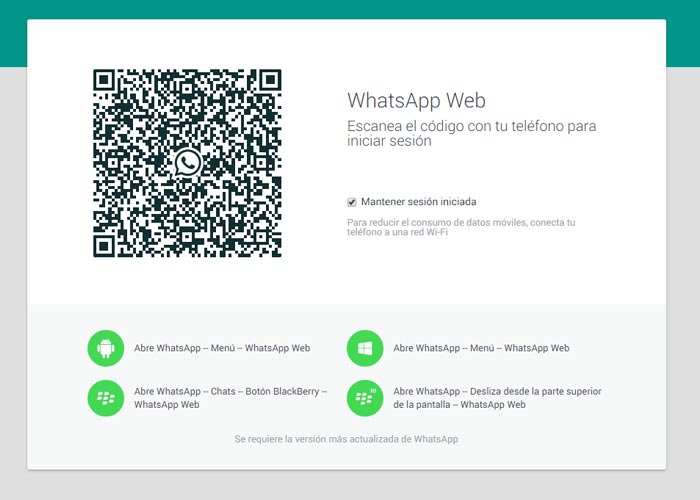
Since the arrival of the desktop version of WhatsApp , much has been said and written about it, its advantages and disadvantages, its pros and cons. But there's no doubt that thousands of users, whether for convenience or work, are active daily members of the WhatsApp Web version , be it the Windows version or the version for Apple computers running Macs . That's why we're going to tell you how to update WhatsApp Web to the latest version . Let's get started!
WhatsApp Web update for Windows
From your Windows computer, access the desktop version of the application at web.whatsapp.com. If you haven't yet synced your mobile version of WhatsApp with the web version, simply go to your application on your smartphone, tap the three dots in the upper right corner next to the magnifying glass, then tap where it says WhatsApp Web, and you will be given the option to scan the QR code that appears on your computer screen. And that's it, you'll automatically have the desktop version available to chat from your PC.

Once synced, if a new update is available, it will appear automatically, just like in the mobile version of WhatsApp Messenger, with the message: " Update available - click to update WhatsApp ." Follow the same steps as for updating on Android or iPhone. WhatsApp Web updates its versions very frequently, so for security and to stay up-to-date with the latest features, always update!
WhatsApp Web Updates for Mac
First, we need to check which version of macOS we have on our computer, as the web version of WhatsApp only works with OS X 10.9 and later. Once we've checked this, the process for syncing the app with our computer is identical to that for Windows. To check for new updates, simply open the WhatsApp website on your Mac and if you see a message saying "Update available» We click and it will automatically switch to the new version with all the new features and security systems.

Updates available for other devices and platforms
As expected from the world's most downloaded and used direct messaging application, it supports use on multiple devices, therefore for those users who use BlackBerry-type phones.
How to update WhatsApp for BlackBerry?

Update for BlackBerry
As expected, BlackBerry users can also enjoy the messaging application and have it updated to the latest version.
To update it, you can only do so from the browser installed on your BlackBerry , provided it is configured with your valid identifier. To do this, follow these steps:
Browser > Browser settings > Browser > Internet browser
Once we've made sure this is correct, we go to the button above to download WhatsApp. If we already have it installed and want to know if there's an update available, this information will appear automatically when we open WhatsApp on the BlackBerry . But if we want to make sure and update it manually, we have to check for the latest version available manually. If the version is higher than ours, we can update it from there.
Extra trick
You can also download and update WhatsApp Messenger from BlackBerry World.
Minimum requirements:
- BlackBerry OS 5.0 or higher
- BlackBerry Internet Service (BIS) or BlackBerry Enterprise Service (BES)
How to update WhatsApp for Nokia S40?
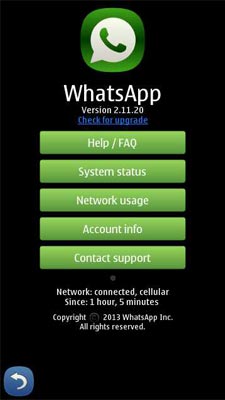
*Note: The Whatsapp version for Symbian Nokia S40 is no longer available.
These types of downloads and updates are compatible with devices running the Symbian S60 operating system , such as Nokia smartphones and some Sony Ericsson and Samsung models. You need to access the internet directly through your Symbian phone's browser to download and install the new update. To download or update WhatsApp Messenger on Nokia phones, simply tap the button above and follow the on-screen instructions.
Minimum requirements:
- Unlimited data contract
- Nokia 40 series cell phones
- Nokia C3-00 / Nokia C3-01 / Nokia X2-01 / Nokia X3-02 / Nokia X3-02.5 (Update) / Nokia X2-00
- Nokia Asha: 201 / 205 Chat Edition / 206 / 208 / 210 / 300 / 301 / 302 / 303 / 305 / 306 / 308 / 309 / 310 / 311 / 515 / 500 / 501 / 502 / 503 / 230
How to download and update WhatsApp for tablet?
This type of update depends on the operating system you're using on your tablet. Therefore, the best way to get the latest WhatsApp Messenger update on your tablet is to know which operating system you're using: Android, iOS, or Windows . If you already know, click on one of the links below and follow the steps:
- How to update WhatsApp on Android tablets
- How to update WhatsApp on iOS tablets
- How to update WhatsApp on Windows Phone tablets
How to download and update WhatsApp Plus to the latest version for free?
When we refer to WhatsApp Plus, we are talking about an external and unofficial modification of this app; therefore, in order to download or update WhatsApp Messenger Plus  It won't be possible to do so from any official marketplace, whether it's the Google Play Store, Apple Store, or others. It's true that this Plus version has a greater number of customization and integration options, therefore offering more possibilities than the original version of WhatsApp.
To download and/or update it, you'll need to use the WhatsApp Plus APK file . To do this, simply go to WhatsApp Plus Messenger and follow the steps to get the latest version.
How to become a Beta Tester and try out the latest version of WhatsApp that nobody has seen?
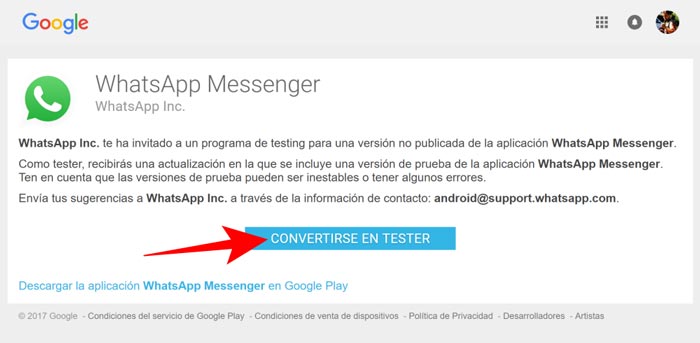
If you want to have the Beta version of your favorite app and be among the first to enjoy the latest features WhatsApp has included, you're in luck. I'm going to tell you how to download and update the beta or testing versions that WhatsApp includes in many of its updates before they are officially released on the Google Play Store.
These versions have new features, functionalities, and surprises that only you will be able to enjoy long before everyone else. There are basically two ways to do this: the first is by being a member of the Google Play beta program , and the second is by automatically downloading the WhatsApp Beta APK.
These APK downloads take several weeks , and in some cases months, to become available to the " official " beta testers who are part of the official Android app platform. So forget about waiting and take it to the next level. I present to you an application that automatically notifies you of the different versions of the official WhatsApp APKs. This app is called WhatsApp Beta Updater.
First Option: Become a Beta Tester with the Whatsapp Beta Updater app
Become a WhatsApp Beta Updater here
The first step is simple and the most direct way to get this app on your smartphone: visit the WhatsApp Betatesters website using the button above. There you can become an official tester. Keep in mind that these versions sometimes produce errors since their purpose is to test until a stable version is found.
You've signed up, congratulations! Now, when you access your Google account in the Play Store , search for the WhatsApp app and voilà! You'll see the Beta versions of the app so you can update as they're released. Since we already have WhatsApp installed on our phones, we'll usually see the "Open" button in the Play Store, but since we're now Official Testers, if there's a new update, the button will say "Update . "
Second Option: Download and update using APK files
Download and Install APK WhatsApp Latest Version
This The second way is faster and specially chosen for those of us who can't wait to test with the Latest Beta version of WhatsApp downloaded directly from Play Store To do this, you need to go to the website. GithubClick the button above and it will automatically start downloading the latest version of file APK and install it.
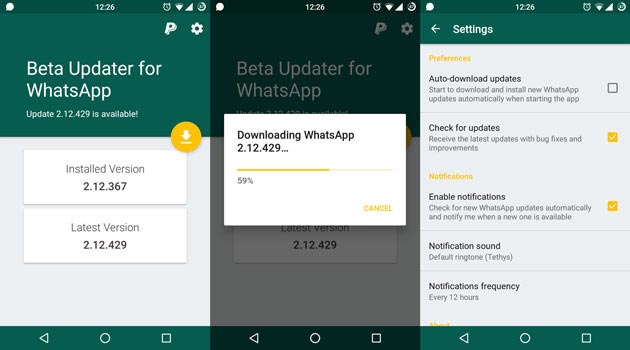
Once the app is installed, it will automatically notify you periodically when a new WhatsApp Beta update is available so you can install and try it out. If you want to check for yourself if a new update is actually available, simply open the WhatsApp Beta Updater app , and it will automatically search for updates. If it finds one, tap the down arrow button to install it.
Once we press the yellow button , the new Beta version of WhatsApp will begin downloading. The typical progress bar will be displayed, filling up to 100%. The download speed depends on your internet connection at that moment, although it usually only takes a few seconds.
Okay, the download is finished. Now your smartphone will ask if you want to install it. Of course, yes! We want the latest version of WhatsApp now! After accepting the installation, if you haven't enabled permissions to install APKs , your smartphone will ask for permission to allow installations from unknown sources . Tap "Accept," and that's it! You can now enjoy the latest features that the most popular instant messaging app has to offer, without waiting to update it from Google Play.
How to update WhatsApp using an APK without using Google Play or marketplaces?
APKs These are installation files that all applications have, whether they are from Google Play or from the App Store In many cases, we will prefer to install these types of files directly on our devices rather than going directly to the official websites. Why might this be happening? Well, as you may know, WhatsApp occasionally releases beta versions that are only visible to certain users. the so-called Beta Tester or Beta UpdaterThese users have the necessary permissions to try out and test the new «Update» of the application to correct errors or possible weaknesses against viruses.
To update WhatsApp using APKs without using Google Play or the App Store, follow these steps:
- Step 1: Go to Settings > Security > Unknown sources/Unknown origins and activate the option that appears.
- Step 2: Now we're going to download the file WhatsApp APKYou have the download links above.
- Step 3: If you are using a computer, connect your mobile phone using a USB cable, open the phone's folder, and move the previously downloaded APK file to your smartphone.
- Step 4: We click on the downloaded file and the installation of the new Whatsapp update will automatically begin.
- Step 5: To reset the security system so that apps from unknown sources are not installed, we perform step 1 but in reverse, that is, we disable the Unknown Sources/Unknown Origins option.
And that's it! Enjoy the new version!
Automatic WhatsApp updates: is it possible?
If you want to always have the latest version of WhatsApp for free on your operating system, but don't want to manually update the application every time, you can find the " Automatic Update " function in your phone's App Store settings menu , which does everything automatically.
The only drawback to this option is the inability to control when the WhatsApp update is downloaded . This would be very useful, for example, if we only want to receive updates while using Wi-Fi, avoiding data usage. However, if you decide to enable this option, remember that it will automatically update all other apps on your phone.
FAQ: How to download and update WhatsApp to the latest version?
Questions and answers about doubts, problems, or concerns you might have when trying to keep your favorite app updated. Solutions to common errors and problems . If you still have questions after reading, leave them in the comments; your questions or advice will surely help many other users.
What do I do if I can't update WhatsApp due to lack of space or memory?
This problem occurs because there is not enough storage space on your smartphone; these errors correspond to errors 101, 498, or 910. As a general rule, it is recommended to have 1GB of free space available to download and install app updates.
Follow these 2 easy steps:
- Settings > More > Apps > Application manager > Google Play Store > Clear cache
- Restart your phone and try updating WhatsApp Messenger again.
Are you still getting the same error? Try this:
- Clear cache data in Settings > More > Storage > Cached data > Clear cached data
- Move files and other applications to your external storage SD card.
- Consider deleting files, photos, videos, or other applications that you don't use.
Check and delete the files that are in WhatsApp's hidden folders:
- The videos are located at: /WhatsApp/Media/WhatsApp Video/Sent
- The images are located at: /WhatsApp/Media/WhatsApp Images/Sent
- The location of the voice messages is: /WhatsApp/Media/WhatsApp Voice Notes
What do I do if I can't update WhatsApp because of "Invalid package file"?
If you see error code 403, 495, 504, 911, 920, 923 or RPC errors , do the following:
Delete your Google account at:
- Settings > Accounts > Accounts > Google > Account preferences > Delete your Google account
- Turn your phone off and on again, and go back to «Accounts» to add your Google account.
Clear the cache of the "Google Play Store" app in:
- Settings > More > Apps > Application manager > Google Play Store > Clear cache
- Try downloading the app again.
How do I update my WhatsApp if it has already expired?
To renew WhatsApp , the first thing we must verify is that the time and date on our device are correct, because if the device date is incorrect, this will cause problems in the application, displaying a message that WhatsApp has expired.
Another factor could be that the version we're using isn't updated to the latest version, because we might be using an older version. The solution is obvious: we need to go to the Google Play Store and search for WhatsApp. If it says " Update ," it means we don't have the latest version.
This problem is common in older cell phones , as some people stop using them and the application comes from the factory in an old or outdated version of Whatsapp.
Is it possible to update WhatsApp Messenger without a password?
To install and update apps on your Android smartphone, you need a Gmail account to access the Play Store . If you've forgotten your password, follow the steps to reset your Gmail password here.
How can I disable automatic updates on WhatsApp?
Another drawback of automatic updates can occur when traveling abroad, where internet connection costs are much higher. Therefore, I highly recommend learning how to disable all automatic updates.
To disable automatic updates on Android phones, open the Google Play Store and tap the three dots in the top left corner of the app . This will open a menu. Go to " Settings, " then under " Auto-update apps, " and select " Don't auto-update apps ."
To disable automatic updates on your iPhone, open the Apple Store settings menu , go to " Automatic Downloads " and turn off the option.
List of devices NOT compatible with WhatsApp updates
Future versions of the WhatsApp messaging app will not be compatible with:
- Nokia Symbian S60 after June 30, 2017
- BlackBerry OS and BlackBerry 10 after December 31, 2017
- Windows Phone 8.0 and later after December 31, 2017
- Nokia S40 after December 31, 2018
- Android versions 2.3.7 and later after February 1, 2020

Table of Contents
- 1 Why is it important to download and install the latest available WhatsApp Messenger update?
- 2 How to install and update WhatsApp for free from Google Play on Android?
- 3 How to download the latest version of WhatsApp Messenger on iPhones?
- 4 How to update WhatsApp for Windows Phone without paying?
- 5 How to install and update WhatsApp Web?
- 6 Updates available for other devices and platforms
- 7 How to download and update WhatsApp Plus to the latest version for free?
- 8 How to become a Beta Tester and try out the latest version of WhatsApp that nobody has seen?
- 9 How to update WhatsApp using an APK without using Google Play or marketplaces?
- 10 Automatic WhatsApp updates: is it possible?
- 11 FAQ: How to download and update WhatsApp to the latest version?
- 11.1 What do I do if I can't update WhatsApp due to lack of space or memory?
- 11.2 What do I do if I can't update WhatsApp because of "Invalid package file"?
- 11.3 How do I update my WhatsApp if it has already expired?
- 11.4 Is it possible to update WhatsApp Messenger without a password?
- 11.5 How can I disable automatic updates on WhatsApp?
- 11.6 List of devices NOT compatible with WhatsApp updates






Comments are closed.