Tor has become the emblem of browsers that can most efficiently keep our data hidden while we browse the Internet.
There is a lot of information (some accurate, some not so much) about this browser , which is closely linked to the Deep Web . If we need to remain hidden, we will have to meet certain requirements, as the browser alone cannot perform its function with 100% accuracy.
In this report, we'll give you all the facts and information you need to know about Tor. We'll teach you the best tricks to browse without any problems, keeping you hidden from others at all times. We'll also talk about JavaScript and why you need to disable it.
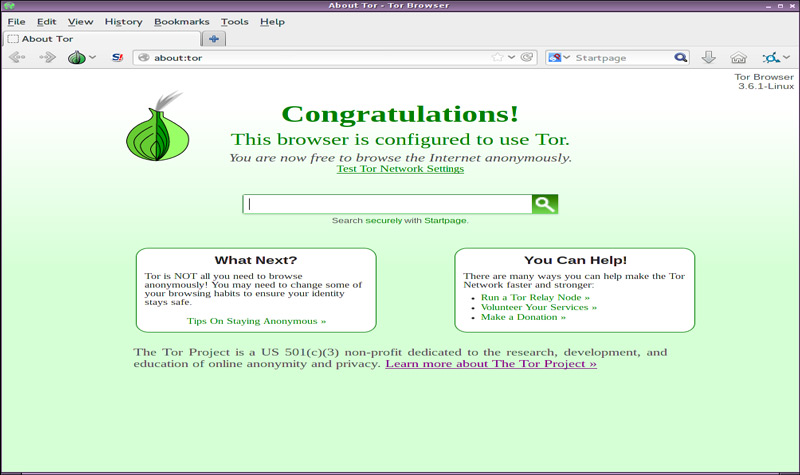
Tor Browser only works with session cookies , and persistent cookies of the "As far as I know" type (AFAIK) are considered session cookies.
In principle, our security would not be so endangered according to this system, but since there are other factors that also determine the level of privacy, it is advisable to delete cookies and verify that self-destructing cookies really do not exist when closing a session.
If we want to delete session cookies before logging back into Tor , we will need to modify the settings.
To do this, we will go to the onion icon and select " New identity ", this way we can access it again as if it were the first time we entered.
To disable JavaScript, we will need to follow these steps:
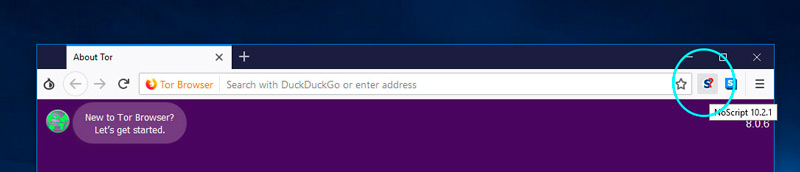
- We started the software.
- We select the icon «S", which corresponds to Noscript
- We click on «Choice«
- We search «General«
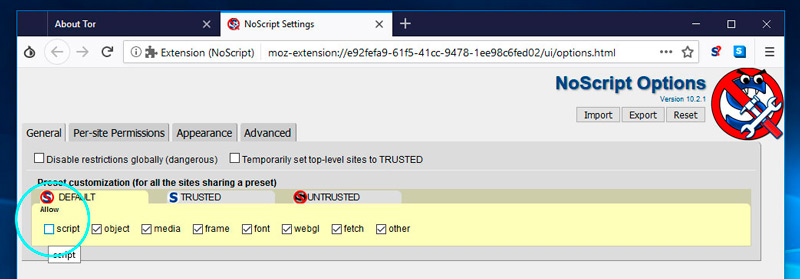
- Click in "Script«
- We chose "Predetermined«
There is another way, which is to use the " JavaScript Switcher " tool, which we will add to the browser and which will allow us to enable or disable JavaScript.
We will follow this procedure:
- We installed «JavaScript Switcher«
- We click on «Menu «
- We select «Add-ons«
- We typed in the search bar «JavaScript Switcher«
- We chose the first option
- We click on «Add to Firefox«
- We select «Add«


There is a third way to disable JavaScript , and that is through a manual procedure directly in Tor.
To complete this step, we will perform the following procedure :
- In the address bar we type «about:config«
- We select «I accept the risk! "
- We type in the bar «enabled«
- And we activate through «False«
List of the 15 best tricks and tips to get the most out of Tor Browser

The following are the best browser tricks you can find; with them, you'll become an expert in hidden browsing:
The main purpose, or rather, the essential characteristic of the Tor browser is precisely to not expose our data to members of the Internet network through autonomy and security protocols.
To do this, we'll need to work with different data than what we typically use on other websites. We can use temporary email addresses and any aliases we don't use elsewhere . We also can't use our Tor alias in browsers other than secure ones.
Cryptocurrencies
It is advisable not to use real money when making transactions, but rather this type of virtual currency to maintain our anonymity.
Banks or financial institutions
Something that is quite logical, but necessary to recommend, is that if we want to continue browsing without them knowing our data, we cannot interact with banks or any official body that presents the same characteristics, since they will ask us to identify ourselves and it will defeat the purpose of browsing in Tor.
Tor Security
This browser is said to be as secure as any VPN , but being a browser, it also works with scripts, which makes it a reliable tool in terms of security, but with some limitations if we don't pay attention to certain details.
The problem arises when our operating system is not updated , making it vulnerable to intruders. When we browse on a vulnerable operating system, Tor cannot fulfill its intended function, which is to maintain our privacy completely.
Although when we access the browser, our IP address changes to one that is surely thousands of kilometers away from our location, thus providing great peace of mind in not identifying our computer, we should not abuse this situation.
It has been proven that when browsing from the same computer, to the same web pages, or near the same location with the same device, they have been able to determine the real origin of the computer and the identity of the user.
The whole point of browsing through Tor is to avoid identifying ourselves ; if we need to access one of our social networks, Tor cannot do its job because we will have to register.
Both the Deep Web and the traditional Internet offer different browsers that keep our real identity hidden. If we use a different type of browser, such as Chrome or Internet Explorer (and are redirected to another site) , it won't make sense to browse through Tor, because these browsers can easily identify us through their cookies.
Integrate Raspberry Pi with Tor Browser
We can install a router, that is, a " Raspberry Pi " at the internet access point , so that once we have downloaded Tor we can pass all data packets through the Raspberry Pi and thus remain hidden.
To configure Raspberry Pi :
- We open the Raspberry Pi command line
- We wrote
sudo apt-get update - Accept
- Then we write
sudo apt-get install iptables-persistent git - Accept
- We select «Yes«
- Accept
Once we have the Raspberry Pi configured, we would need to turn it into the access point. For this, we will need this script :
- We wrote
git clone https://github.com/unixabg/RPI-Wireless-Hotspot.git - Accept
- then
sudo ./install - Accept
- We followed the setup instructions
We already have Raspberry Pi configured as an access point, what we need now is to install Tor.
We will do this by following these steps :
- We wrote
sudo apt-get install tor - Game
sudo nano /etc/tor/torrc - And we select
Ctrl + X
Finally, we would need to tell the router what traffic we are going to send to the Internet through the Tor software.
Update Tor Browser
It is necessary to keep your browser constantly updated, as this will prevent your real IP address from being detected through leaks that can often occur due to vulnerabilities in other computers.
Windows
We recommend not using Tor with Windows operating systems; the weaknesses of the operating system in the C++ template-based library (TBB) present the greatest points that can be hacked.
Remove JavaScript, Java, and Flash
It is recommended to disable these programs, as they do not maintain the level of privacy we require. If any website uses one of these programs, we recommend not opening its URL.
Use Linux
To increase Tor's efficiency, it's recommended to run it on a Linux operating system, configuring it to be compatible with the latest Tor versions. Additionally, you should consider adding Privoxy, which works very well as a proxy, and choosing either Tails or Whonix.
It is advisable to permanently delete all cookies, as they could create a vulnerability in your computer through TBB or Tails (which we recommend using). This includes not only self-destructing cookies but also session cookies.
Mobile Phone
To maintain absolute privacy, we recommend not having your mobile phone in the same place you are accessing through Tor. This simply means that, if you want to avoid being identified, you can often be identified through your phone, which has applications designed for this purpose.
Storage units
In order for Tor to perform its job efficiently and thus keep our privacy highly protected, we will also need the storage units to be encrypted by configuring them through Linux.
How can I download Tor?
We've already explained the different features of the Tor browser ; now all you need to do is download it. You can get it for Windows or macOS using the following links, depending on your operating system:
Download Tor Browser for Windows
Download Tor Browser for macOS
Table of Contents
- 1 Why doesn't the Tor browser disable cookies? Does this affect my privacy?
- 2 How to disable JavaScript in the Tor browser for even more security?
- 3 List of the 15 best tricks and tips to get the most out of Tor Browser
- 3.1 Anonymity for browsing
- 3.2 Cryptocurrencies
- 3.3 Banks or financial institutions
- 3.4 Tor Security
- 3.5 Navigation time
- 3.6 Social Media
- 3.7 Use of browsers
- 3.8 Integrate Raspberry Pi with Tor Browser
- 3.9 Update Tor Browser
- 3.10 Windows
- 3.11 Remove JavaScript, Java, and Flash
- 3.12 Use Linux
- 3.13 Delete cookies
- 3.14 Mobile Phone
- 3.15 Storage units
- 4 How can I download Tor?